

Databricks Workspace
Connect to Databricks Workspace APIs using a Service Principal to manage clusters, jobs, SQL warehouses, and more.
Connect to Databricks Workspace APIs using a Service Principal with OAuth 2.0 client credentials to manage clusters, jobs, SQL, and more.

Supports authentication: OAuth 2.0
Set up the agent connector
Section titled “Set up the agent connector”Register your Scalekit environment with the Databricks Workspace connector so Scalekit handles the authentication flow and token lifecycle for you. The connection name you create will be used to identify and invoke the connection programmatically. You’ll need a Databricks Service Principal with an OAuth secret.
-
Open workspace settings
-
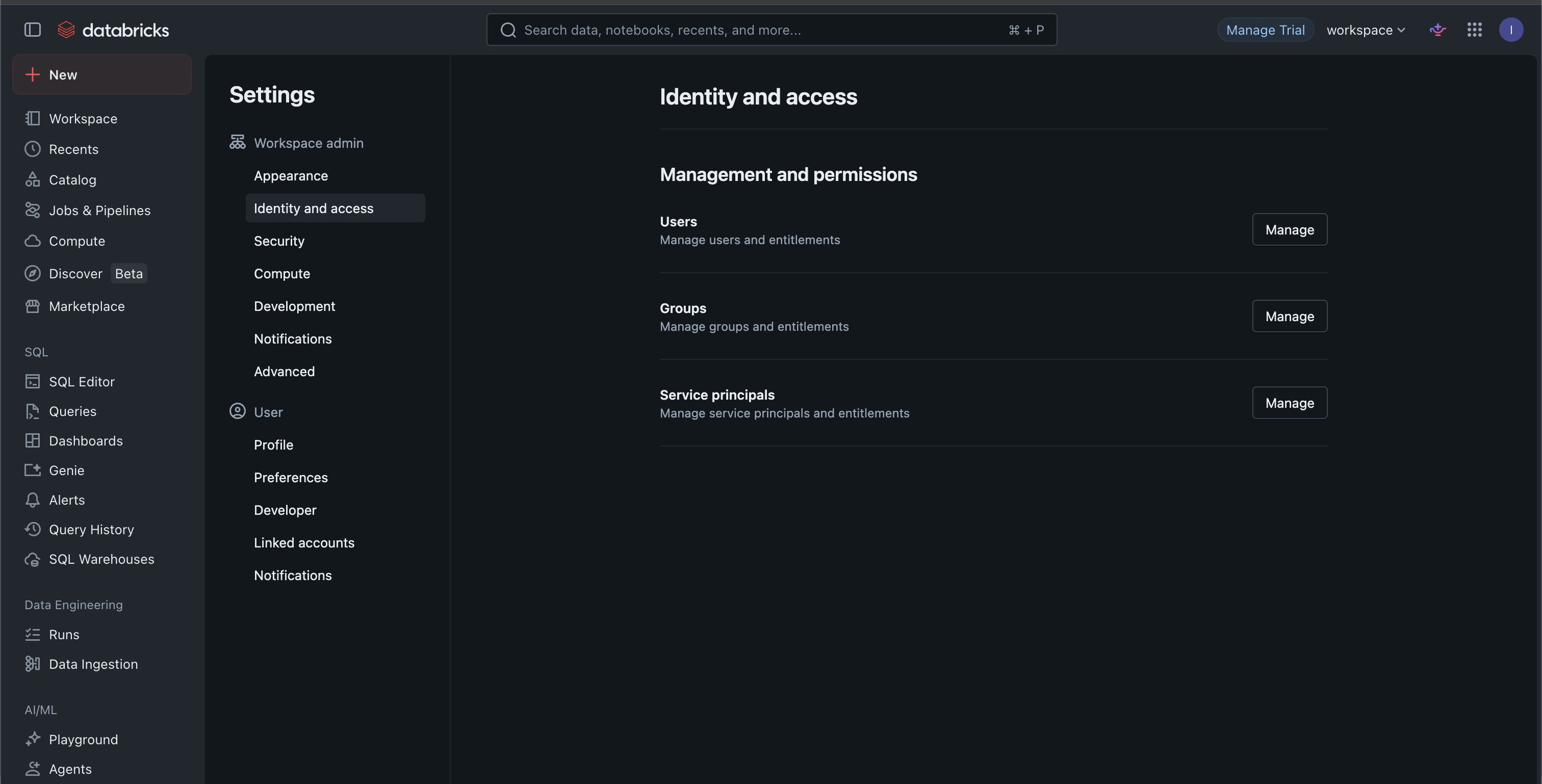
Log into your Databricks workspace and click Settings in the left sidebar.
-
Under Workspace admin, find Identity and access and click Manage next to Service principals.
-
-
Add a service principal
-
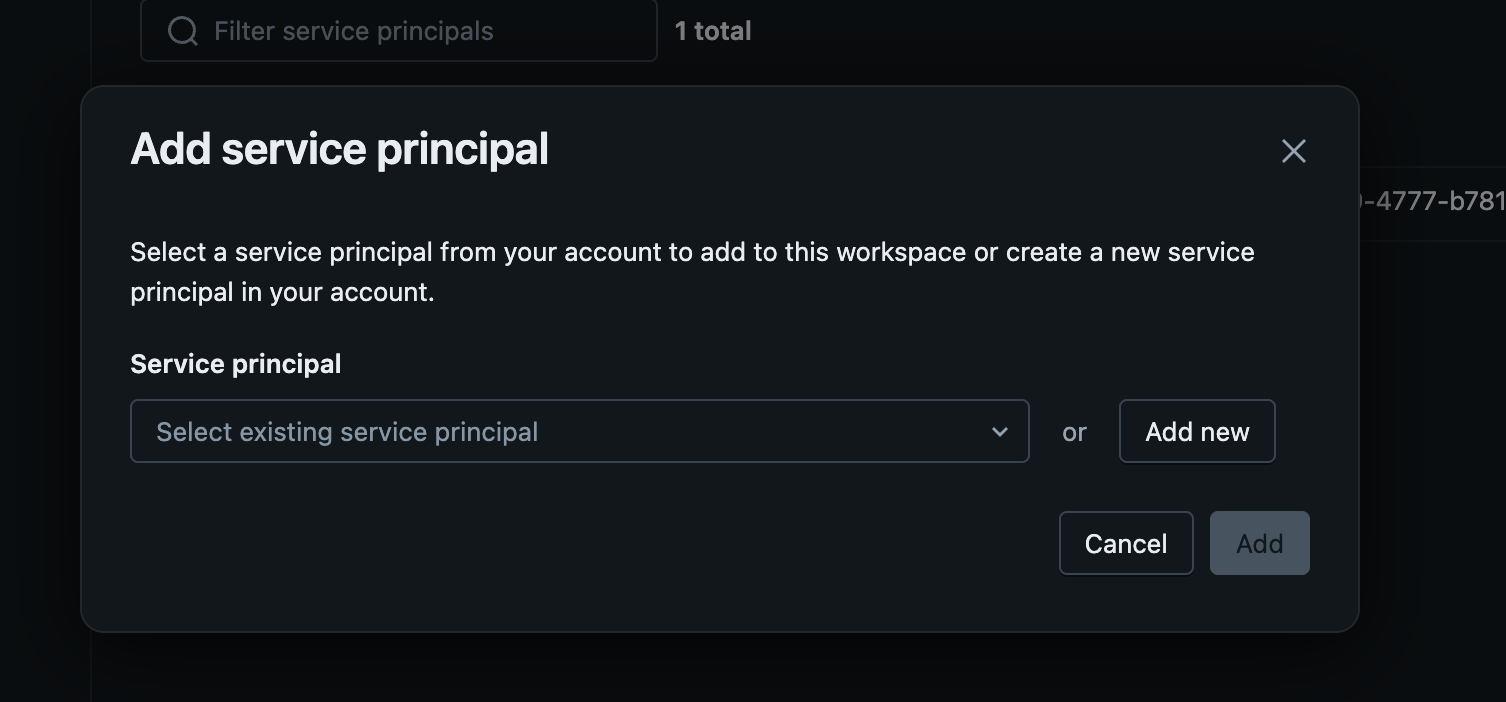
Click Add service principal.
-
Select an existing service principal from your account, or click Add new to create one.
-
-
Generate a client secret
-
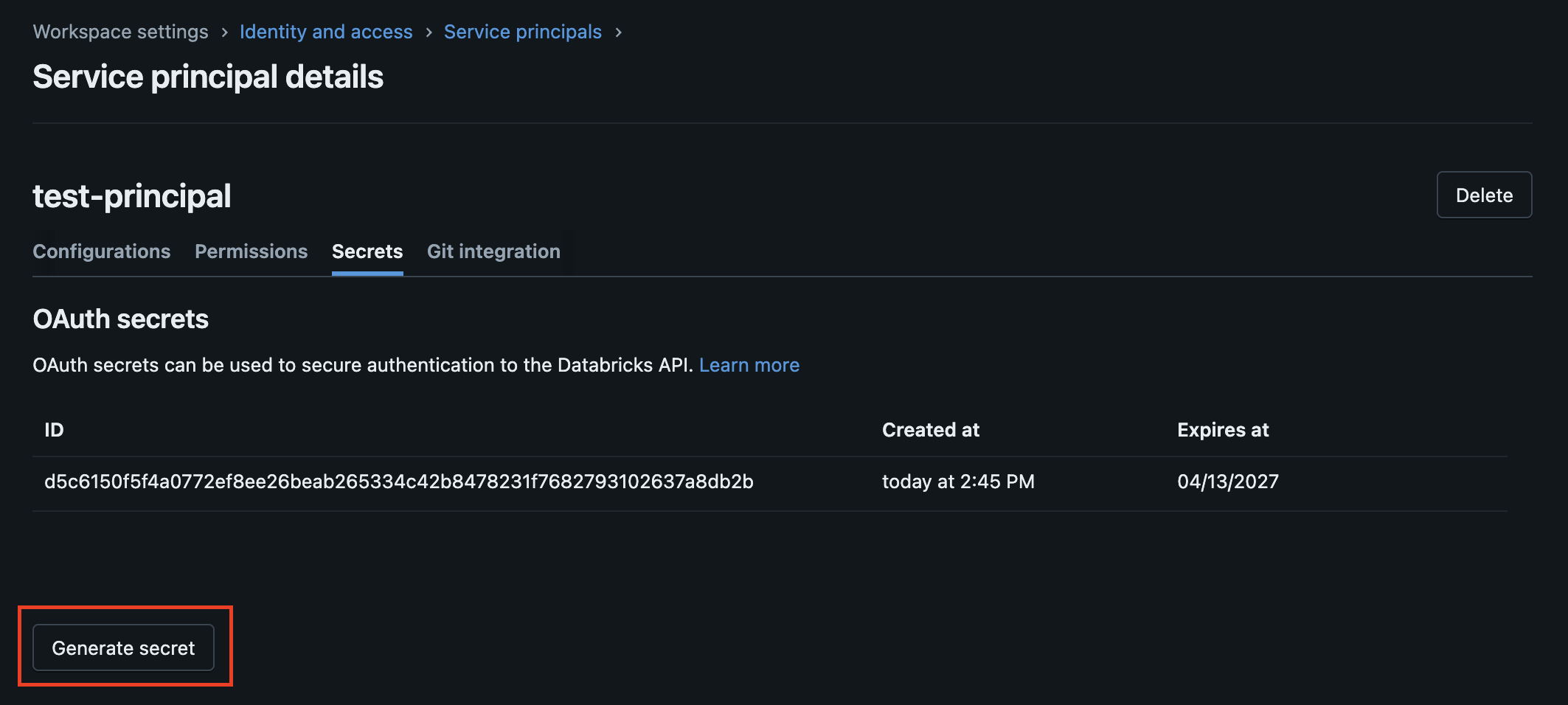
Click on the service principal to open its details page.
-
Navigate to the Secrets tab and click Generate secret.
-
Copy the Client ID and the generated Client Secret — the secret is only shown once.
-
-
Add credentials in Scalekit
-
In Scalekit dashboard, go to Agent Auth → Create Connection.
-
Find Databricks Workspace from the list of providers and click Create.
-
Enter the credentials you copied:
- Workspace URL — your Databricks workspace hostname without
https://(e.g.adb-1234567890.1.azuredatabricks.net) - Client ID — the service principal’s Application (client) ID
- Client Secret — the secret you generated
- Workspace URL — your Databricks workspace hostname without
-
Click Save.
-
Connect to Databricks Workspace APIs using a Service Principal — Scalekit handles OAuth token management automatically.
You can interact with Databricks in two ways — via direct proxy API calls or via Scalekit optimized tool calls. Scroll down to see the list of available Scalekit tools.
Proxy API calls
import { ScalekitClient } from '@scalekit-sdk/node';import 'dotenv/config';
const connectionName = 'databricksworkspace'; // get your connection name from connection configurationsconst identifier = 'user_123'; // your unique user identifier
// Get your credentials from app.scalekit.com → Developers → Settings → API Credentialsconst scalekit = new ScalekitClient( process.env.SCALEKIT_ENV_URL, process.env.SCALEKIT_CLIENT_ID, process.env.SCALEKIT_CLIENT_SECRET);const actions = scalekit.actions;
// Make a request via Scalekit proxy// Assumes a connected account already exists for this identifierconst result = await actions.request({ connectionName, identifier, path: '/api/2.0/clusters/list', method: 'GET',});console.log(result);import scalekit.client, osfrom dotenv import load_dotenvload_dotenv()
connection_name = "databricksworkspace" # get your connection name from connection configurationsidentifier = "user_123" # your unique user identifier
# Get your credentials from app.scalekit.com → Developers → Settings → API Credentialsscalekit_client = scalekit.client.ScalekitClient( client_id=os.getenv("SCALEKIT_CLIENT_ID"), client_secret=os.getenv("SCALEKIT_CLIENT_SECRET"), env_url=os.getenv("SCALEKIT_ENV_URL"),)actions = scalekit_client.actions
# Make a request via Scalekit proxy# Assumes a connected account already exists for this identifierresult = actions.request( connection_name=connection_name, identifier=identifier, path="/api/2.0/clusters/list", method="GET")print(result)Scalekit Tools
Tool list
Section titled “Tool list”databricksworkspace_cluster_get
Section titled “databricksworkspace_cluster_get”Get details of a specific Databricks cluster by cluster ID.
| Name | Type | Required | Description |
|---|---|---|---|
cluster_id | string | Yes | The unique identifier of the cluster |
databricksworkspace_cluster_start
Section titled “databricksworkspace_cluster_start”Start a terminated Databricks cluster by cluster ID.
| Name | Type | Required | Description |
|---|---|---|---|
cluster_id | string | Yes | The unique identifier of the cluster to start |
databricksworkspace_cluster_terminate
Section titled “databricksworkspace_cluster_terminate”Terminate a Databricks cluster by cluster ID. The cluster transitions to a TERMINATED state — this is reversible. The cluster configuration is retained for 30 days (unless pinned) and can be restarted via the start API. To permanently remove a cluster and its configuration, use the Databricks /permanent-delete endpoint directly.
| Name | Type | Required | Description |
|---|---|---|---|
cluster_id | string | Yes | The unique identifier of the cluster to terminate |
databricksworkspace_clusters_list
Section titled “databricksworkspace_clusters_list”List all clusters in the Databricks workspace.
This tool takes no input parameters.
databricksworkspace_job_get
Section titled “databricksworkspace_job_get”Get details of a specific Databricks job by job ID.
| Name | Type | Required | Description |
|---|---|---|---|
job_id | integer | Yes | The unique identifier of the job |
databricksworkspace_job_run_now
Section titled “databricksworkspace_job_run_now”Trigger an immediate run of a Databricks job by job ID.
| Name | Type | Required | Description |
|---|---|---|---|
job_id | integer | Yes | The unique identifier of the job to run |
databricksworkspace_job_runs_list
Section titled “databricksworkspace_job_runs_list”List all job runs in the Databricks workspace, optionally filtered by job ID.
| Name | Type | Required | Description |
|---|---|---|---|
job_id | integer | No | Filter runs by a specific job ID. If omitted, returns runs for all jobs |
limit | integer | No | Number of runs to return. Defaults to 20, maximum is 1000 |
offset | integer | No | Offset of the first run to return, used for pagination |
databricksworkspace_jobs_list
Section titled “databricksworkspace_jobs_list”List all jobs in the Databricks workspace.
| Name | Type | Required | Description |
|---|---|---|---|
limit | integer | No | Number of jobs to return. Defaults to 20, maximum is 100 |
offset | integer | No | Offset of the first job to return, used for pagination |
databricksworkspace_scim_me_get
Section titled “databricksworkspace_scim_me_get”Retrieve information about the currently authenticated service principal in the Databricks workspace.
This tool takes no input parameters.
databricksworkspace_scim_users_list
Section titled “databricksworkspace_scim_users_list”List all users in the Databricks workspace using the SCIM v2 API.
| Name | Type | Required | Description |
|---|---|---|---|
count | integer | No | Maximum number of results to return per page |
filter | string | No | SCIM filter expression to narrow results (e.g. userName eq "user@example.com") |
startIndex | integer | No | 1-based index of the first result to return, used for pagination |
databricksworkspace_secrets_scopes_list
Section titled “databricksworkspace_secrets_scopes_list”List all secret scopes available in the Databricks workspace.
This tool takes no input parameters.
databricksworkspace_sql_statement_execute
Section titled “databricksworkspace_sql_statement_execute”Execute a SQL statement on a Databricks SQL warehouse and return the results.
| Name | Type | Required | Description |
|---|---|---|---|
statement | string | Yes | The SQL statement to execute |
warehouse_id | string | Yes | The ID of the SQL warehouse to execute the statement on |
catalog | string | No | The Unity Catalog name to use for execution |
schema | string | No | The schema to use for execution |
databricksworkspace_sql_warehouses_list
Section titled “databricksworkspace_sql_warehouses_list”List all SQL warehouses available in the Databricks workspace.
This tool takes no input parameters.